
 Time Lapse
 Repeats the contained tasks according to the specified parameters (total duration / number of loops, interval, ... ). This task typically contains just the Acquisition > Suitable for capturing any “living” processes such as cell proliferation, FRAP, etc. |
 Capture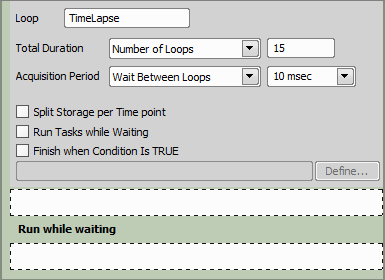
Figure 1222.
Select one of the following time lapse modes:
Set a precise amount of time to be used as the Timelapse duration [msec / sec / min / hour(s)].
Define the number of loops (how many times will the containing tasks executed).
Use this function if you don't know when to stop the time lapse. With this setting it can be stopped manually or automatically after a program break.
Select No-delay to let the task run as fast as possible. Two other options specify a time interval between two adjacent repetitions of the task. Run Loop Every option specifies how fast the tasks are started. Wait Between Loops defines a time pause between the end of one loop and the beginning of the next one.
Other tasks can be performed repeatedly if there is a spare time between two adjacent loops. When you check this option, additional space named Run while waiting appears at the bottom of this task. Place the tasks which you want to run while waiting for the next loop into this area.
Especially if a time lapse with Unknown total duration is defined, you can specify a conditional expression which will cause the loop to be discontinued. Click Define to specify the conditional expression (Please see Using Expressions).
 Redefine Time Lapse
 This task is usually used within a Condition (Conditions > | Requires: Task: |
 Condition (If)
See Time Series > Time Lapse for description of the task options.
 Time Sequence
Chains acquisition time-phases and phases of different types (temperature / gas control, perfusion control). Typical sequence: set temperature, capture timelapse, change temperature, wait, capture timelapse. |
Please see the Time-lapse Acquisition chapter for description of the task options.
 Repeat N times
 Repeats the contained tasks for the specified number of iterations or indefinitely until Conditions > Manual creation of a point set (Stage XY Points > |
 Add Point to Point Set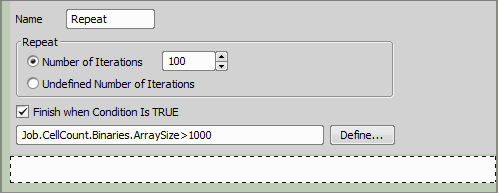
Figure 1223.
Here you can choose from the following options:
Insert a number to define how many times the tasks will be repeated.
Use this function if the loop will be exited either by the Conditions >  Break task or by the Finish when condition is TRUE option.
You can specify a conditional expression which will cause the loop to be exited. Click Define to specify the conditional expression. See also Using Expressions.
 Keep Object In View
 This function finds the object of interest based on the correlation between the previous and the next frame and always keeps it in the center of view using the microscope stage to compensate the object's motion. Keeping the moving cell in the center of the field of view while capturing a timelapse. | Requires: Task: Device: Motorized Stage Module: |
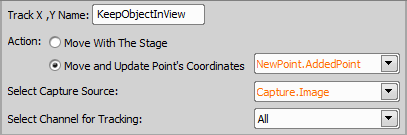
Figure 1224.
The first action moves the stage to keep the object in view, whereas the second option moves the stage to the current center of the object and updates coordinates of your points defined in different tasks (e.g. Stage XY Points >  Loop over Points defined by Stage XY Points >
  Generate Points).
 Python Loop
 Repeats the contained tasks according to a loop defined in Python code. Define a loop using Python language. |
During JOB execution, three user-editable functions control the loop behavior: loop_init, loop_condition and loop_step.
Called once at the start of the loop execution.
This function must return a limjob.Loop object that defines the experiment loop and the loop iteration parameters.
Create the loop object using one of the limjob.Loop.make... functions.
def loop_init(Job: limjob.JobParam, ctx: limjob.RunContext) -> limjob.Loop:
         return limjob.Loop.makeCountLoop(0)
Called at the beginning of each iteration.
This function decides whether the loop should continue or terminate.
For simple cases, it is usually sufficient to delegate the decision to the loop object:
    def loop_condition(loop: limjob.Loop, Job: limjob.JobParam, ctx: limjob.RunContext) -> bool
return loop.check()Called at the end of each iteration.
This function advances the loop state to the next iteration and should return loop.next().
def loop_step(loop: limjob.Loop, Job: limjob.JobParam, ctx: limjob.RunContext) -> limjob.Loop:
              return loop.next()
Inputs
See System >  Python Script task for more details on common parameters.
Provides access to Job parameters. You can read and modify simple variables (numbers, strings, etc.).
Provides access to the Job run context.
Represents the current loop state for the active iteration.