
 Define ROI
Draw ROIs inside the live image and stimulate them using the connected stimulation device. |
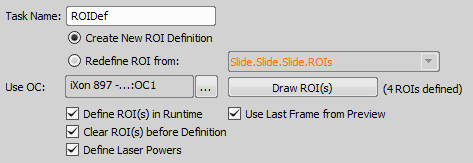
Figure 1262.
Redefines the existing Stimulation ROI Definition from the selected point/well loop/ROI from analysis.
This button runs the Live view and opens the Simple ROI editor (see: ROI > Simple ROI Editor).
If checked, the last frame from the preview is used for the ROI definition.
Note
To assign a stimulation ROI using DMD / Galvo XY to a preset, please register the preset using the DMD / Galvo XY Pad in advance.
 Use ROI from Analysis
 This task takes binaries created in analyses and applies them as stimulation ROIs during stimulation experiments. Measure features of the cells using the cell count analysis and stimulate them later on in the job. | Requires: |
 Define Analysis
 General Analysis
 Cell Count Analysis
 Intensity Analysis
 General Analysis RGB
 Wound Healing
 Assign ROI to Point/Well
This task assigns the stimulation ROI defined in the ROIs > Draw ROIS on a single well and assign them to different wells on a well plate which will be stimulated later on in the job. | Requires: |
 Loop over Points
 Loop over Wells

Figure 1263.
Select the desired ROIs > Define ROI or ROIs > Use ROI from Analysis definition.