PFS On and Focus
Turns the Perfect Focus System (PFS) on and tries to find the PFS focal plane. Make sure the Z drive focal plane is not too far from the PFS focal plane otherwise the task may fail. Use this task in long-term live-cell experiments (timelapses) to solve the axial focus fluctuations in real time. | Requires: Device: Perfect Focus System |
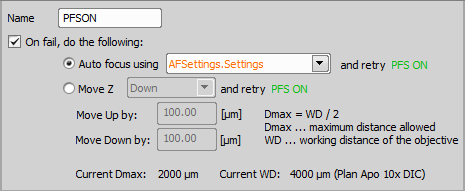
Figure 1271.
If you check On fail, do the following, more actions can be done when PFS fails. Auto focusing can be done using a selected Autofocus + Focus Surface >  Autofocus Settings task or Z stage can be moved up/down by a specified value.
 PFS Off
This task switches the PFS Off. Use this task in the job to turn the PFS off whenever it is not needed. | Requires: Device: Perfect Focus System. |
 PFS DM In
Puts the Dichromatic Mirror (DM) in the optical path of the Perfect Focus System (PFS). Use this task for conducting experiments that require the exclusion and then returning the dichromatic mirror back in the optical path of the PFS. | Requires: Device: Perfect Focus System. |
 PFS DM Out
Puts the Dichromatic Mirror (DM) out of the optical path of the PFS. Use this task for conducting experiments that require the exclusion of the dichromatic mirror. | Requires: Device: Perfect Focus System. |
 PFS Offset from the current z position
Finds a PFS offset for the current Z position and sets it as the current offset. Use this task to ensure that exactly the same Z level will be kept when PFS is switched on. | Requires: Device: Perfect Focus System |
 Auto PFS Focus Setup
Defines settings to be used by the PFS > Use this task to set up the Auto PFS offset. | Requires: Device: Perfect Focus System Stage Z |
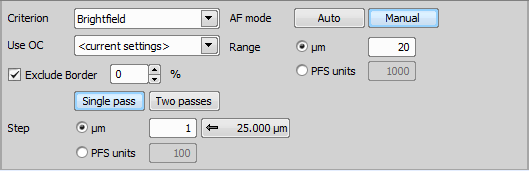
Figure 1272.
Select the focus criterion based on the nature of your specimen.
 Auto PFS Focus
The PFS system searches for the most in-focus plane and sets the PFS offset accordingly. This task uses settings defined by the PFS > Use this task for creating a PFS surface. | Requires: Device: Perfect Focus System, Stage Z |
See Creating PFS Surface for a sample use case.
 Assign PFS to Point/Well
Uses the current Z position to specify PFS offset for the selected XY position (e.g. a well). Use this task inside a loop over XY points after PFS > | Requires: Device: Perfect Focus System |
 Loop over Wells
 Loop over Points

Figure 1273.
Select one of your sample holder positions.
See Creating PFS Surface for a sample use case.
 Create PFS Surface
Calculates the global PFS surface from an existing set of PFS positions. To XY positions without the PFS position defined, the PFS position of the closest XY point (which includes PFS position) is copied. Use this task for creating a global PFS surface. | Requires: Device: Perfect Focus System, Motorized Stage |
See Creating PFS Surface for a sample use case.
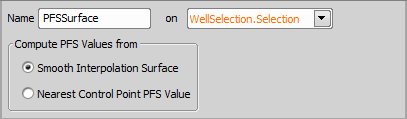
Figure 1274.