

Select a slide from the vertical list. If regions were captured, only those will be displayed. For slides without defined regions, the full slide preview is shown.
To find a particular slide simply enter the keywords into the Search... bar. To organize a big amount of scanned slides, use the tree structure.
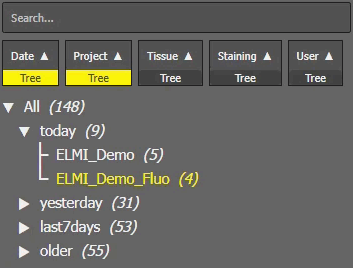
Figure 1532. Tree View.
Choose a tree element (User, Project, Tissue, Date, Staining) and click to add this element into the tree. Add multiple elements to create a specific filtering tree that will filter your data based on your need. Click and drag the element rectangle to the left or right to change the tree hierarchy. The triangle right next to the element switches the ordering of its data. Finally click on the tree triangles and nested items to browse through the tree data or use +/- to Expand all/Collapse all.